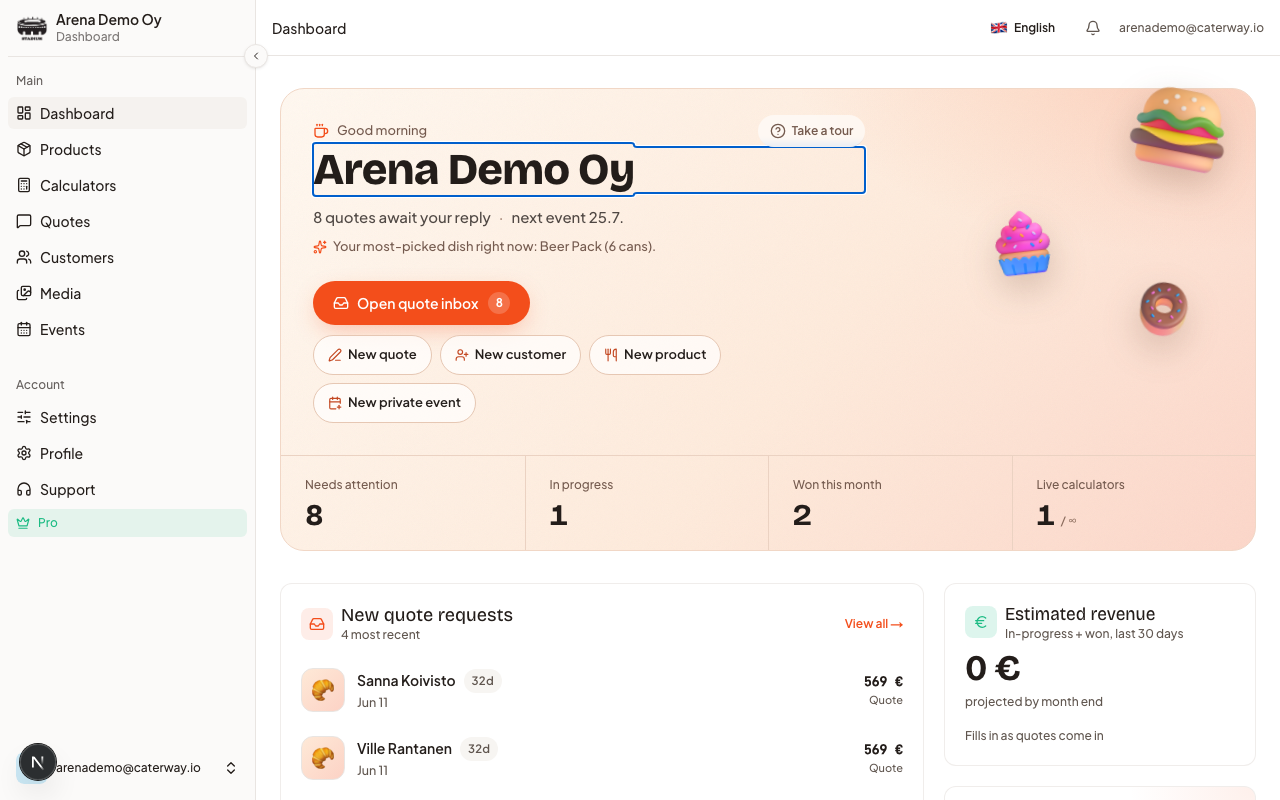
Your dashboard opens with a greeting, a short briefing line ("3 quotes await your reply", "next event 24.7. · 60 guests"), and four quick-action buttons: New quote, New customer, New product, New private event. Below that runs a stat rail: Needs attention, In progress, Won this month, Live calculators.
Guided Setup
New accounts see a Get your calculator live checklist right under the hero, it walks you through creating a category, adding a product, building a calculator, and publishing it. See Guided Setup and Tours.
The main cards
| Card | What it shows |
|---|
| New quote requests | Your most recent incoming quotes, with a Respond shortcut |
|---|---|
| Upcoming events | Confirmed private events in the next few weeks |
| Arena listings | Public gigs you're part of (Pro only) |
| Estimated revenue | In-progress + won value over the last 30 days, with a trend line |
| Upgrade to Pro | Shown only on the Free plan |
| Tips & tricks | A rotating daily tip in both languages |
On mobile
The mobile dashboard is a different layout built for a phone: a single "awaiting your reply" hero card, a Create new row (Quote / Event / Customer / Product), two stat tiles (this week's new requests, this month's estimated revenue), an upcoming-events carousel, and a recent-activity feed. See CaterWay on Your Phone for the rest of the mobile experience.
Was this article helpful?